Turnitin Draft Coach: What It Does and Who Gets It

Turnitin Draft Coach checks citations, similarity and grammar while you write in Microsoft Word or Google Docs. It is free, but only your school can switch it on. It never produces a full similarity or AI report.
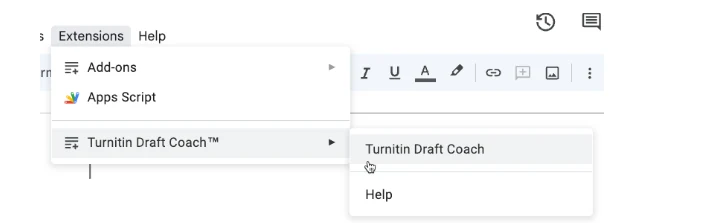
What Draft Coach checks
Draft Coach runs three checks on the document you are already writing. It looks for missing citations, text that matches Turnitin's database, and grammar errors a marker would notice.
Results appear in a side panel while you type. Nothing goes to your tutor, and no report is stored for later.
- Citation check: flags missing references and broken formatting.
- Similarity check: shows text that matches sources Turnitin already holds.
- Grammar check: suggests fixes you can accept in place.
The add-on does not judge your argument, your evidence or your structure. It never tells you that a paragraph is weak, only that its sources are uncredited.
The similarity panel is the one that saves marks. It catches copy-paste you forgot to cite before anyone else reads your draft, and it names the source.
Who gets access
Draft Coach comes with an institutional licence for Turnitin Feedback Studio or Originality. If your school licenses neither product, the add-on will not appear in your menu at all.
That is why a personal Turnitin password gets you a login screen and nothing more. Access follows the school licence, not the student and not the payment.
Ask your library or writing centre which Turnitin products your school pays for. Most answer in one email, and the answer decides whether this page applies to you.
If the Turnitin tab appears but throws an error, your account may have lost the licence. That is an admin problem, not something you can fix from your side.
Undergraduate and postgraduate students usually get the same tool. There is no separate research version of Draft Coach.
What it does not tell you
Draft Coach is a writing aid, not a submission check. It shows no AI percentage and no match list with sources and percentages.
Turnitin's AI writing detection only runs on a submitted document. That report needs 300 to 30,000 words of prose and a supported file type before it will generate.
So a clean Draft Coach session proves little about your final report. Treat it as a stronger spell-check, not a green light.
The grammar suggestions are generic by design. Accepting all of them can flatten your voice, which is the opposite of what a marker rewards.
Draft Coach also has no view of your submission settings. If your tutor excludes quotes and the bibliography, the add-on check and the final score will differ.
How students use it well
Run the citation check first, because a missing reference is the cheapest fix on the list. Do it once the draft is complete, not paragraph by paragraph.
Wait before you touch the grammar panel. Rewriting sentences mid-draft breaks the structure you just built, and you will rebuild it twice.
Write down the source names from the similarity panel. You need them when you rewrite the flagged sentence in your own words.

Where to get a real report
Turnitin does not sell single checks to students. Without a school account, a paid pre-submission service is the only way to see a similarity and AI report before you upload.
For the access question, read is Turnitin free for students. It covers what a school account includes and what it does not.
For the AI number itself, see the Turnitin AI detection guide. It explains the score without the hype.
Both routes take a few minutes and give you a number you can compare against your next draft.
FAQ
Is Turnitin Draft Coach free?
Yes, for students at schools that license Feedback Studio or Originality. You cannot buy it on your own.
Does Draft Coach show an AI score?
No. It checks citations, similarity and grammar only. The AI percentage appears in the Turnitin report after submission.
Can I use it in Word and Google Docs?
Yes, the add-on works in both. Your school has to enable it for your account first.
Check your paper before you submit — you get a similarity score and an AI score in one report.