Turnitin Class ID and Enrollment Key Explained

Your Class ID and enrollment key come from your instructor or your institution. They are the two codes that place your account inside the right Turnitin class. Nobody legitimate sells them, and no outside site can issue them for you.
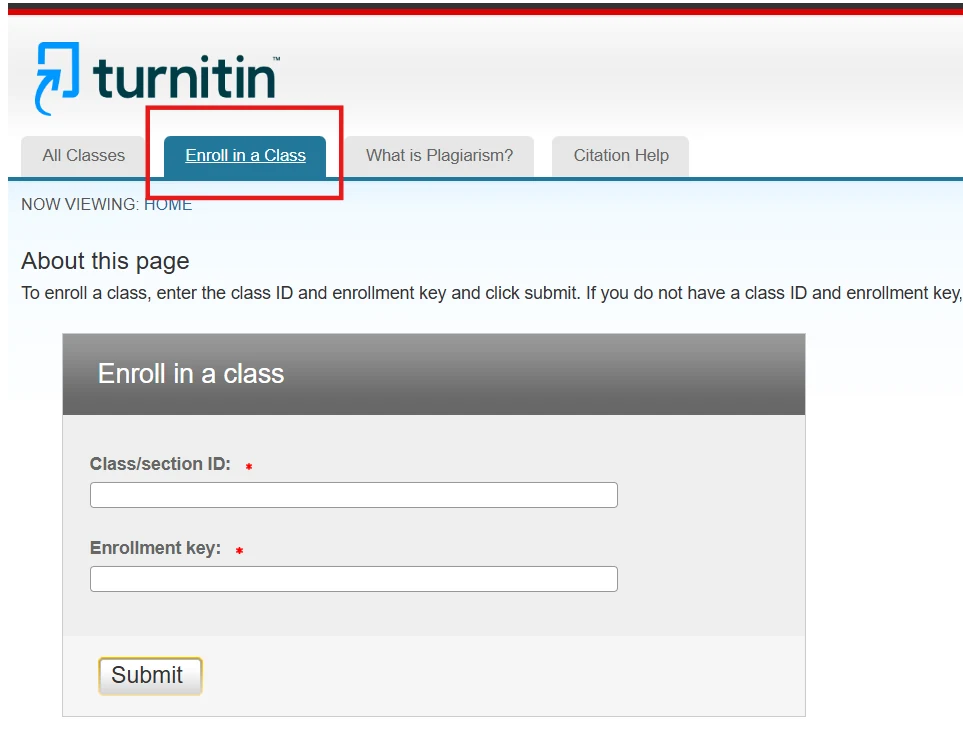
What the two codes do
The Class ID identifies one class section on Turnitin. The enrollment key is the password for that section. Together they let a student account join the class an instructor has created.
Both are generated when the instructor sets up the class. Neither is a personal ID, and neither is tied to your student number.
Where to get them
Ask the person teaching the course. Instructors usually post the pair on the course page, in the syllabus, or in the first announcement of the term.
If the course page has nothing, contact your department office or the campus IT help desk. They can confirm whether your institution uses Turnitin at all.
- Not from a website that sells Turnitin access.
- Not from a classmate in a different section.
- Not from an email that pushes you to log in through a link.
Turnitin does not sell individual licences, so a site offering you a Class ID for money is not providing institutional access. Our guide to whether Turnitin is free for students explains what your institution pays for.
Joining a class step by step
Sign in through your institution's own Turnitin link, not through a search result. Open the enrollment screen and type the Class ID exactly as given, then the enrollment key.
Codes are case-sensitive. Copy and paste them where you can, and delete any trailing space. If the screen rejects the pair, check the details with your instructor before you try again.

After you enroll: what you should see
The class home page lists each assignment with an Upload column, a Grade column, and a Similarity column. An empty Similarity column is normal for a short time after upload, because the report is still processing.
When something stays missing, our guide to a Turnitin report not showing walks through the usual causes.
If the key does not work
Enrollment keys can expire, and instructors can reset them at any time. An expired key is not an error on your side, so ask for the current one.
If you already enrolled once, you do not need the key again. Adding the same class a second time usually fails because you are already a member.
The most common mistake is joining the wrong section, because two sections can share a course name. Check the section number against the Class ID before you submit any work.
Another is using an old browser tab that still holds a previous student's session. Sign out, close the tab, and sign in again through your institution's link.
Keep the codes out of public places
An enrollment key opens your class to anyone who has it. Do not post it in a group chat, a public forum, or a screenshot you share online.
If the key leaks, tell your instructor. They can reset it without disrupting the rest of the class.
FAQ
Can I find my Class ID without my instructor?
Only your institution can supply it. The class belongs to them, and the codes are tied to that class section.
Is the enrollment key the same as my password?
No. The key is a shared password for the class, while your login password belongs to your own account. Never reuse one as the other.
Do I need a new key every semester?
Yes, in most setups. Each class section has its own Class ID and key, so last term's pair will not work.
Check your paper before you submit — you get a similarity score and an AI score in one report.