Turnitin Report Not Showing: Five Common Causes

A missing Turnitin report is normal for the first few minutes after you upload. If the Similarity column stays empty for hours, the cause is usually the file, the assignment settings, or the due date. Work through the five causes below in order.

Cause 1: the report is still processing
Turnitin needs time to compare your file with its database. Short papers finish quickly, and long ones take longer. Refresh the assignment list instead of resubmitting.
A second upload restarts the process and can overwrite a report that was nearly ready.
Cause 2: the assignment has no report enabled
Instructors can switch off similarity reports for a draft, a practice dropbox, or a peer review task. If the column is empty for everyone in the class, this is the likely reason.
Cause 3: the due date has not passed
Many courses release reports only after the deadline, so students cannot copy from each other. The report exists, but it stays hidden until the instructor's release date.
Your course page usually states that setting. If it does not, ask before you assume something is broken.
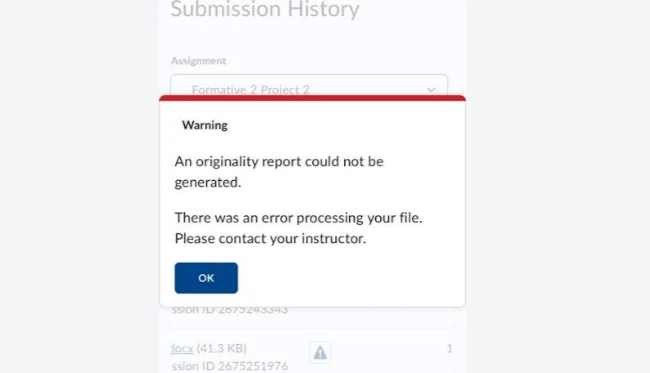
Cause 4: the file could not be processed
The submission history will show a clear line if this happened: an originality report could not be generated because of an error processing the file. That is different from a report that is simply late.
The usual fixes are a supported format, a file under 100 MB, and 300 to 30,000 words of prose. Our checklist for a failed Turnitin submission covers each one.
Cause 5: you are looking in the wrong place
Reports open from the Similarity column, not from the Grade column. On a phone, the columns can collapse into a menu that is easy to miss.
Open the assignment itself and look for a percentage next to your name. A dash or a blank cell means the report has not been released.
If you enrolled in two sections by mistake, your submission may sit in the other class. Open each class from the dashboard and look for your file.
An account that is not enrolled in any class will show no reports at all, even after a successful upload.
A ready report shows a percentage in the Similarity column, and that cell becomes a link. Open it and the match overview loads with colour-coded passages.
A dash instead of a number means the report is not released yet. A blank cell means no report has been generated.
When to ask for help
Wait a day before you escalate, unless the deadline is close. Then send your instructor the assignment name, your submission time, and a screenshot of the row.
Once the report appears, our guide to reading a Turnitin similarity report shows which numbers matter and which do not.
Do not email a different account, and do not submit the same file from a second profile. Duplicate submissions create duplicate matches and can trigger a misconduct review.
Keep one clean copy of the file. If the report never appears, that copy is what your instructor will ask for.
FAQ
Why is my Similarity column empty but my file was uploaded?
Upload and report generation are separate steps. The file arrived, and the report is either processing or not enabled for that assignment.
Does resubmitting make the report appear faster?
No. A new upload restarts the process and can delay the report you were waiting for.
Can I see the report before the due date?
Only if your instructor allows it. Many courses hide reports until after the deadline by design.
Check your paper before you submit — you get a similarity score and an AI score in one report.