Turnitin Submission Failed: What to Fix First

A failed Turnitin submission is usually a file problem, not a penalty. The uploader rejects a file when it cannot read the text inside. Check the format, the size, and the word count before you upload again.
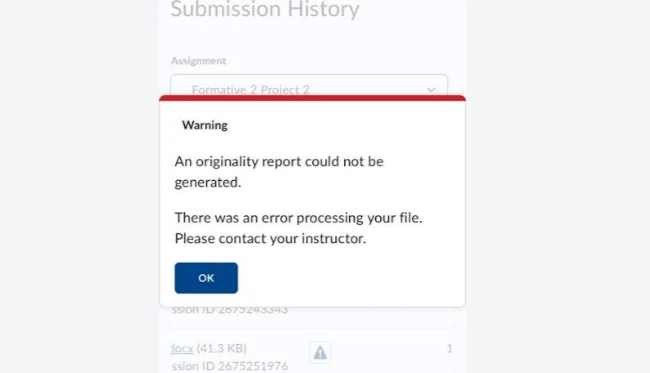
The error you are probably seeing
Turnitin's submission history can show a line saying an originality report could not be generated because of an error processing the file. The upload itself may look complete, which is what confuses most students.
That message means Turnitin stored the file but could not extract usable text from it. The fix is nearly always inside the file.
Check the format, the size and the word count
An AI Writing Report needs a .docx, .pdf, .txt, or .rtf file. A PDF made by scanning paper is only a picture, so there is no text for Turnitin to read.
- Save Word documents as .docx, not .doc.
- Do not upload a photo or a screenshot of a page.
- If your PDF came from a scanner, export the original file instead.
Files must stay under 100 MB, and an AI report needs between 300 and 30,000 words of prose. A short abstract or a very long thesis chapter can both fall outside that range.
The full requirements sit in why your Turnitin AI report won't generate. Turnitin counts words, not pages.

Check the language
AI detection supports seven languages: English, Spanish, Japanese, Arabic, German, Dutch, and Turkish. A paper in another language can still be submitted, but the AI report may not generate at all.
If your course is taught in a language outside that list, ask your instructor which report they expect. Do not assume a missing report is a fault on your side.
Check the document and the file name
Tables, text boxes, and tracked changes often break text extraction. Convert them to plain paragraphs before you upload.
A document with pages of images and little prose can also fail, because there is too little text to compare. That is the same 300-word rule in practice.
Headers and footers are usually ignored, but a title page built from a text box can break the layout.
A file name with unusual symbols can trip the uploader. Rename the file with plain letters and numbers, then try again.
If the upload bar stalls at the same point every time, switch browsers or turn off a download manager. A slow connection can also look like a failed submission.
What to do after a failed attempt
Fix the file, then resubmit to the same assignment. Do not create a second assignment or a second account, because that makes your history harder for the instructor to read.
If the retry fails with the same message, send your instructor the file and a screenshot of the error. Our guide to a report not showing covers the case where the upload works but no report ever appears.
Email your instructor before the deadline, not after it. Attach the file that failed and name the error you saw, so the problem is on record as technical.
Most institutions have a fallback, such as an email submission or an extension for documented upload errors. Ask for it in writing.
FAQ
Did I lose my submission when it failed?
Usually not. The file is often stored, so you can resubmit a fixed version. Check the submission history before you upload again.
Can one large image cause this?
Yes. A heavy file can pass the 100 MB limit on paper and still slow extraction to a stop. Compress images before you upload.
Is a failed submission counted as late?
That depends on your instructor's settings, not on Turnitin. Tell them about the error on the same day.
Check your paper before you submit — you get a similarity score and an AI score in one report.