Turnitin AI Report Requirements: Why Yours Won't Run

An AI report needs three things: a supported file type, a supported language, and 300–30,000 words of prose. The file must also stay under 100 MB. Turnitin shows these same reasons on screen when it skips the check.
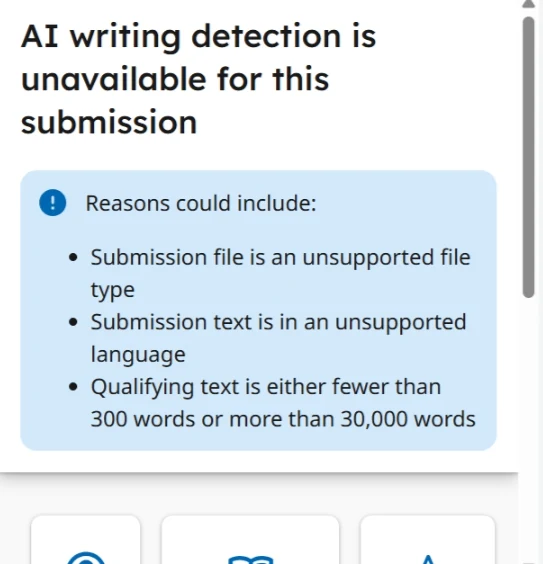
The Three Blocking Reasons
- Unsupported file type.
- Unsupported language.
- Under 300 words or over 30,000 words.
Each one blocks the AI report while the rest of the submission still processes. That is why a missing AI score is often not an error at all.
Read the panel before you email anyone. It usually names the exact rule you broke.
Each reason points at a different fix. Re-uploading the same file wastes a submission and changes nothing.
File Type and Size
The supported types are .docx, .pdf, .txt and .rtf, and the size limit is 100 MB. A Pages or OpenDocument file needs converting first. A scanned PDF carries little extractable prose, so convert it or copy the text into a document.
Export from your word processor rather than uploading a cloud link. Turnitin needs the file itself, not a share page.
Compress images inside the document if the file runs large. The limit is generous for text and tight for photo-heavy reports.
Turnitin lists these rules in its own file requirements page for AI writing reports.
The Word Count Rule
The range applies to prose, not to the whole file. A short lab write-up with heavy tables can fall under 300 words even when the document looks full. If your paper runs past 30,000 words, the check will not run.
Ask your department whether a single chapter can be submitted instead. Most undergraduate work sits comfortably inside the range.
Count the body text only, then compare that figure with the limit. Guessing from page count gives you the wrong answer.
The Language Rule
The detector covers 7 languages: English, Spanish, Japanese, Arabic, German, Dutch and Turkish. German, Dutch and Turkish were added on 6 October 2026. A French or Portuguese draft gets no AI report, however clear the writing is.
The full language list covers the rest.
What Still Runs Without an AI Report
The similarity check is separate and runs in any language. You will still see matching sources even when the AI panel is blank. The two numbers are independent and do not influence each other.
If the text was translated before upload, translated AI text is worth reading before you rely on that blank panel.
A missing AI report never means your paper is clean. It means one check did not happen.
You still have a similarity report and a readable file. That is enough to fix citations while you fix the AI check.
How the Report Looks When It Works
The AI detection guide shows the panels you should see. An AI figure appears with highlighted passages you can click through.
Check for those highlights, not just the number. They are what you will discuss with your tutor if the score is high.
Fixing a Failed Check
- Export to .docx from your word processor rather than uploading a page file.
- Count prose words, not pages or file size.
- Check the language against the supported list.
- Upload again and open the report before the deadline.
Two minutes of checking beats an appeal later. Run the same checks on every draft you submit.
FAQ
Why is my AI report missing when my similarity report is fine?
The two checks run on different rules. Similarity has no word floor and no language list, so it often succeeds where the AI check stops.
Does a 250-word abstract get an AI score?
No. Anything under 300 words of prose is below the minimum, so the AI check is skipped.
Can a lecture slide deck trigger an AI report?
Only if the file type is supported and the extracted prose clears 300 words. Most slide decks fall short.
Check your paper before you submit — you get a similarity score and an AI score in one report.