Turnitin Exclude Quotes and Bibliography: A Guide

Turnitin can leave quoted text, the bibliography and small matches out of the Similarity score. The switches sit in the Filters and Settings panel, and staff usually control them. Many departments reject a filtered score, so confirm the rule first.
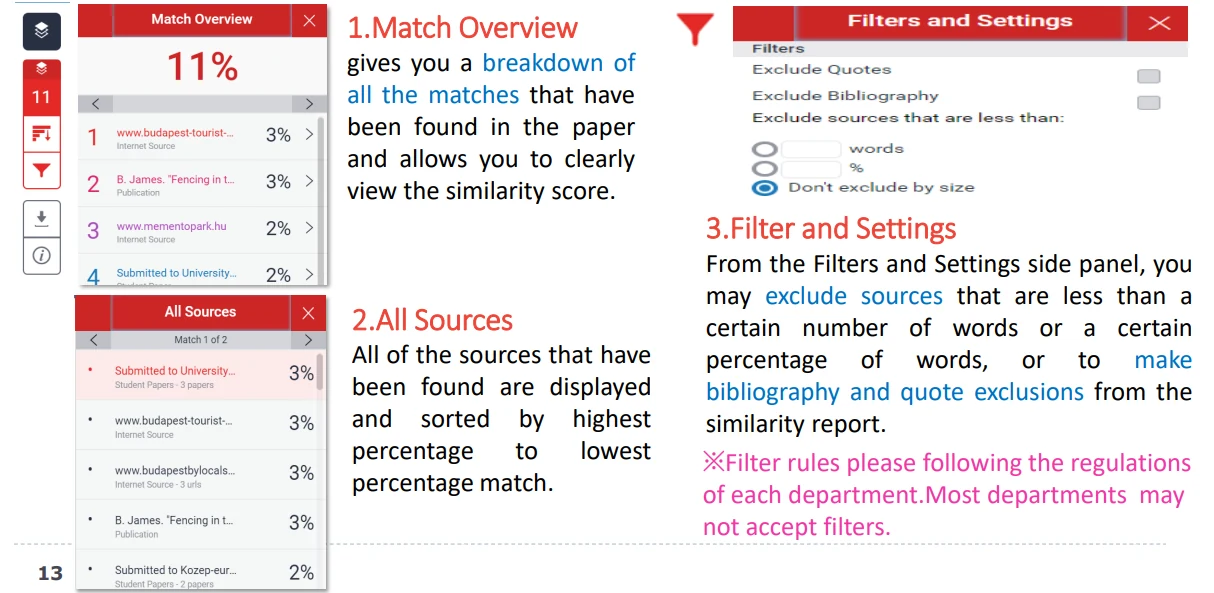
The three exclusions
- Exclude Quotes: ignores text inside quotation marks.
- Exclude Bibliography: ignores the reference list.
- Exclude small matches: ignores overlaps below a word count or percentage you set.
Each one is a toggle in the panel, and the score recalculates when you apply it.
Quotes and the bibliography are the two exclusions departments name most often, because both can inflate a short paper quickly.
Applying a filter
Open the report and find Filters and Settings above the match overview. Switch on the exclusion you need, then apply it.
The percentage and the colour update straight away. The panel keeps showing which filters are active, so a reader can see what was removed.
The official walkthrough in Turnitin's filters and exclusions guide lists the same controls.
A filter changes the report, not the file. Your submission still contains the quoted text and the reference list.
Staff can switch the exclusions back on, so the raw score never disappears. A filtered number cannot be used to argue that a copied passage was never there.
Why departments refuse filtered scores
A filtered report measures less text. That is exactly why some departments record the unfiltered figure: exclusions can hide copied passages inside quotation marks or a padded reference list.
Filtered scores are also hard to compare across a cohort, because two students can end up with different settings. That is one reason a published threshold rarely matches the number on your own screen.
Turnitin's own guidance notes that many institutions will not accept a filtered score, which is worth checking before you quote one in an email.
When excluding is reasonable
A short paper with a long reference list can look alarming without filters. So can a law or literature essay that quotes statutes or primary text at length.
In those cases the exclusion shows the assessor what you actually wrote. Ask first, because a tutor who expects the raw number will read a filtered score as a dodge.
Small-match exclusion is the riskiest of the three. Set too high, it hides real copied sentences, so use it only when shared terminology dominates the file.
Check the score the right way
If a full reference page is inflating your figure, the fix is usually the filter plus a note to your tutor. If a single copied paragraph is hiding behind quotation marks, the filter will not help you.
Judge the result against what a good similarity score means at your institution, and use the full-score checklist when a number looks impossible.
Compare the filtered figure with the raw one before you decide anything. A drop of a point or two is normal; a drop from red to green usually means the excluded text was most of the document.
Before you rely on the filtered figure, do three things:
- Ask your tutor which score the department records.
- Keep both numbers, raw and filtered, in your notes.
- Fix the text if a real copied block remains.
FAQ
Does excluding quotes change my AI score?
No. The similarity and AI figures are independent, so filters on one do not move the other.
Will my instructor know I applied filters?
Turnitin shows the active filters on the report, so a filtered score rarely goes unnoticed. The switches are usually set at assignment level by staff.
Can I remove my own reference list from the score?
Only through the bibliography exclusion, and only if your instructor has enabled it. You cannot edit the matching source list yourself.
Check your paper before you submit — you get a similarity score and an AI score in one report.