Turnitin Similarity Score 100%: Why It Happens

One hundred percent means every word in your file matched text in Turnitin's database. That is a record of overlap, not a finding of plagiarism, and Turnitin says a high score can have innocent causes. Start with the source list, not the colour.

What the score counts
The Similarity score is the share of your text that matches sources Turnitin holds: 91 billion web pages, 1.9 billion student papers and 190 million journal articles. It measures overlap and nothing else.
A cited quotation still counts as matching text. So does a reference list, which repeats the same journal titles as thousands of other papers.
The score counts words, not ideas. A sentence you rewrote in your own vocabulary may not match at all, so a low percentage never proves original thinking.
Why a whole paper reaches 100%
Most full scores come from one file matching one source from the first line to the last. The source list then shows a single entry holding almost all the percentage.
- You uploaded the wrong file: a downloaded copy, a template, or someone else's draft.
- An earlier version of the same work is already in the student paper database.
- The document was shared, so it carries a group's wording.
- The paper came from an essay site or reseller that reused the text.
- The body is original, but references and appendices dominate a short file.
A single source at 100% is also the pattern for resold work, because the database holds a large collection of student papers. Text sold to many students tends to arrive already inside it.
Look at where the highlight sits. Original prose plus a red reference page is a different problem from original prose nowhere at all.
Why the same text comes back twice
Turnitin keeps papers submitted to institutions, not only public web pages. If your draft passed through a class folder last term, it can now sit in the database as a student paper.
Resubmitting an old file therefore matches your own earlier work. The source entry names the institution, so this case is usually settled with a short conversation.
Reading the report before you act
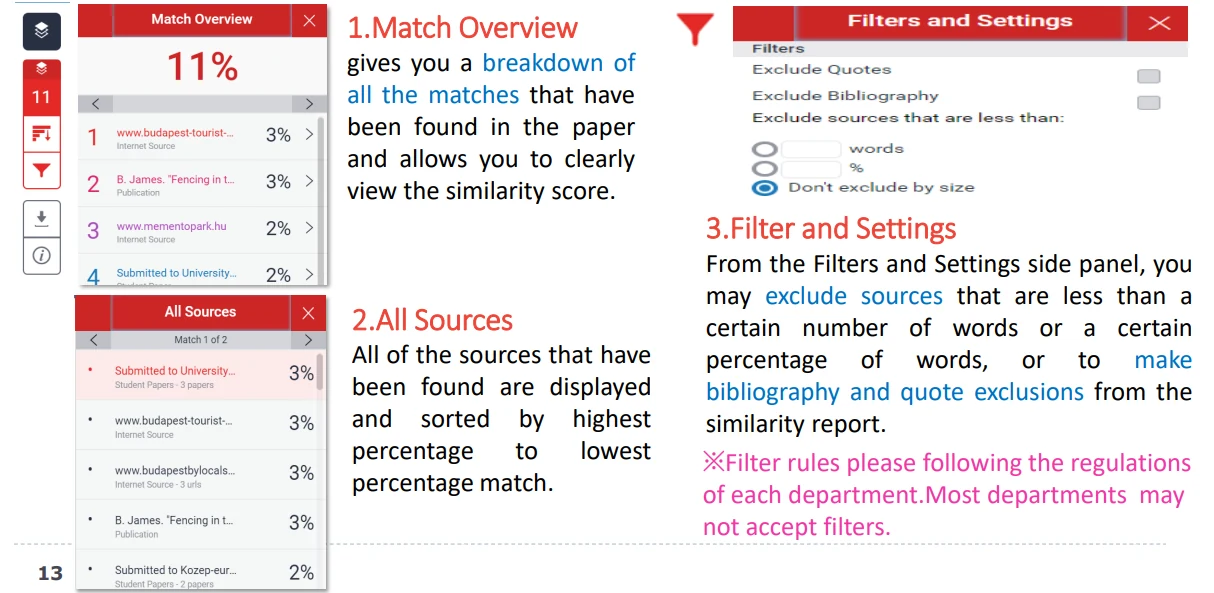
Open Match Overview and count the sources. One source above 90% points to a file mix-up. Twenty sources at 5% each point to ordinary citation overlap.
Then check the filters. Quotes and the bibliography can be excluded in the Filters and Settings panel, but many departments do not accept filtered scores. The guide to Turnitin exclude quotes and bibliography settings covers each switch.
If your institution publishes a limit, compare against that limit rather than the colour. The question behind a good similarity score is the nature of the matches, and only your department can judge that.
What to do next
Download the submission from the assignment and compare it with the file on your computer. If they differ, tell your instructor before the deadline.
If the text is yours, the match usually sits in a reused paragraph or a shared template. Rewrite those blocks, keep the citations you still need, and check the corrected file before the real submission.
Keep a screenshot of the source list and the Match Overview before you edit anything. If a tutor asks how the file was submitted, that record answers faster than memory.
A full score rarely survives a hard look at the source list. Read the percentages, then decide what the document needs.
FAQ
Does 100% similarity mean I will fail?
No. Turnitin states a high score does not by itself mean plagiarism, and your institution decides what happens next. A single-source match is often a file error.
Can one source really cause 100%?
Yes. When every match points to one source, the report is usually showing a document that already exists in the database. The source list makes this visible in one line.
Are quotes and references included in the score?
They can be, unless your instructor enables the exclusions. Many institutions will not accept a score with filters applied, so confirm the rule first.
Check your paper before you submit — you get a similarity score and an AI score in one report.